Automated Excel Cleanup Without Losing Formulas or Formatting
The TidyCell Team · Reviewed September 28, 2026
Most spreadsheet cleaners do not clean your Excel workbook. They extract the visible table, clean the values, and build a new file from scratch. The rows may look better, but the formulas, formatting, charts, pivots, column widths, and other worksheets are gone.
TidyCell takes a different approach: it cleans the .xlsx file you already have. It changes the approved cells inside the original workbook and gives that workbook back—with the Excel parts you did not ask it to touch still there.
Automatic Excel cleanup should not mean rebuilding your file
A workbook is more than a rectangle of values. It may contain formulas that calculate totals, carefully chosen number formats, conditional formatting, frozen panes, charts, pivot tables, hidden reference sheets, print settings, notes, and links between worksheets. Exporting that workbook to CSV—or running it through a tool that quietly converts it into a plain table—throws away the structure that made it useful.
This is why “clean it automatically” is usually followed by a nervous second question: what will the cleaner break?
TidyCell is built around that question. It does not create a replacement workbook and hope it looks close enough. For an Excel .xlsx download, it uses the uploaded file as the base and writes the approved changes back into it.
Clean the data. Keep the workbook.
Open your Excel file in the browser, review the cleanup, and download the real workbook back. No upload and no signup to start.
Automatically clean my Excel fileWhat TidyCell cleans automatically
Drop in an Excel workbook or CSV and TidyCell scans it in the browser. The first result is not a mystery “Clean” button. It is a list of specific problems found in your file, with counts and examples:
- Leading, trailing, and doubled spaces that break matching and create fake categories.
- Inconsistent date values that need one dependable representation.
- Repeated casing variants such as
WEST,West, andwest. - Placeholder empty values such as
N/A,none, and stray spaces. - Fully blank rows that add noise without containing a record.
- Exact duplicate rows, with the first copy kept.
- Misplaced header rows in exports that begin with report titles or notes.
Other focused tools handle problems that need a separate decision: converting numbers stored as text, splitting combined columns, and diagnosing broken lookups. Each approved fix becomes its own step, so you never have to accept an all-or-nothing rewrite.
See every proposed change before it touches the workbook
Automatic does not have to mean invisible. Tidy Cleanup names every cleanup it found, shows how many cells or rows are affected, and includes representative before-and-after values. Each fix has its own checkbox. Turn off anything you do not want, then apply the rest together.
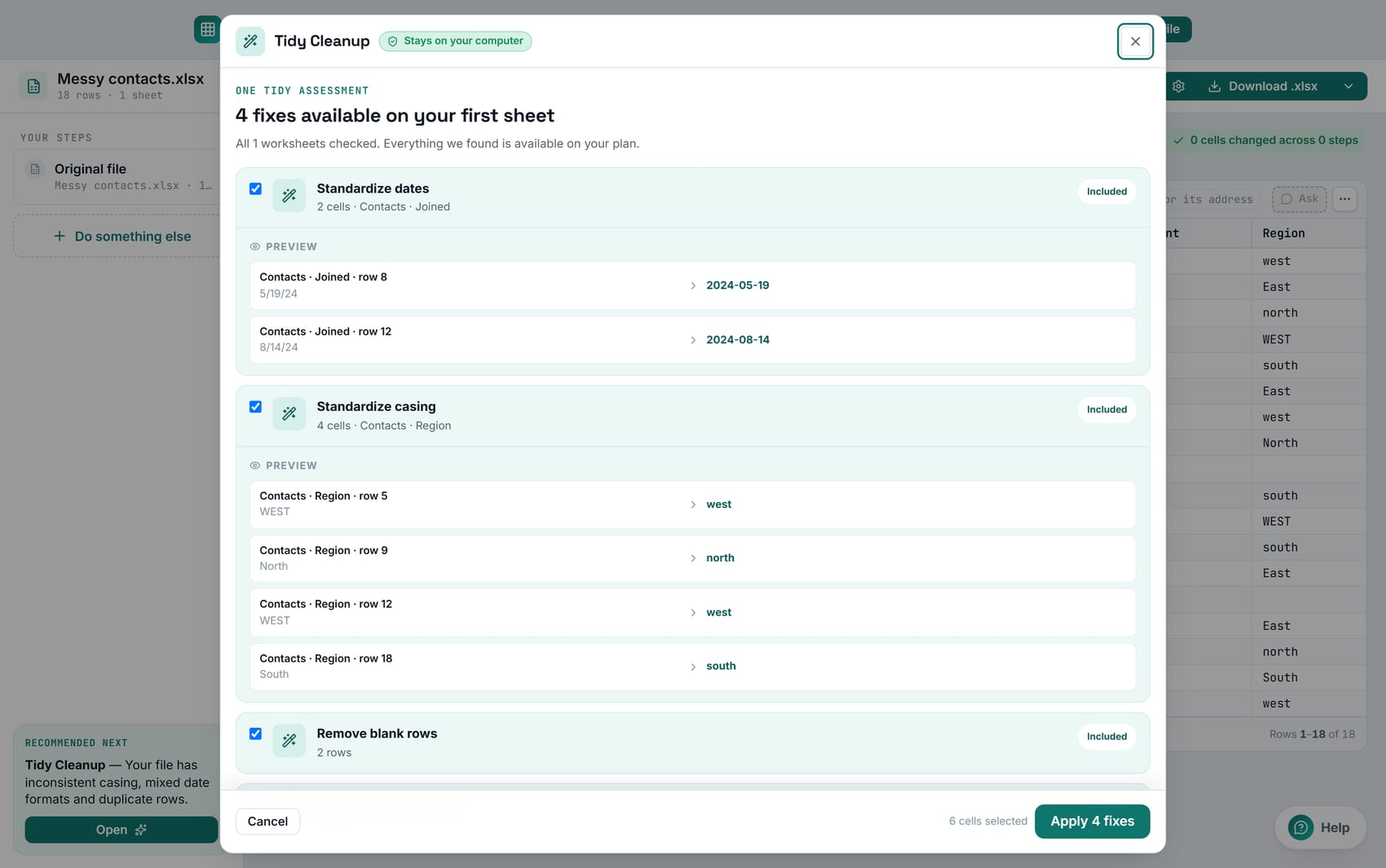
After applying a cleanup, switch between Original, Cleaned, and Changes-only views. Undo the entire step or compare the final workbook cell by cell before downloading it. The automation does the repetitive work; you keep the judgment.
How formulas survive the cleanup
Formula cells are protected from value-cleaning operations. If a column contains formulas, TidyCell does not replace those formulas with their last calculated values just because the values happen to resemble text, dates, or numbers. The cleaner changes source values it can safely identify and leaves calculations alone.
The .xlsx download then writes those approved value changes into the original workbook package. Existing formulas remain formulas. Formatting attached to untouched cells remains formatting. Other worksheets stay in the workbook and keep their order.
That is materially different from downloading a freshly generated spreadsheet. A rebuilt file can imitate the visible grid; it cannot automatically reconstruct the workbook logic and design that were discarded during import.
What stays in the Excel file
| Workbook part | What happens |
|---|---|
| Formulas | Remain formulas; cleanup operations do not overwrite formula cells |
| Cell formatting | Number formats, fonts, fills, borders, and alignment remain in place |
| Charts and pivots | Their workbook parts are retained instead of recreated |
| Worksheets | Untouched sheets remain present and in their original order |
| Tables and drawings | Preserved; risky structural edits may be refused |
| Approved values | Only the reviewed cleanup changes are written back |
There is one important condition: choose the Excel .xlsx download. CSV, TSV, JSON, and other text formats contain values, not workbook features. OpenDocument.ods and legacy .xls downloads are also values-only exports in TidyCell. The download picker says so directly. If formula and formatting preservation is the reason you came, Excel .xlsx is the format you want.
Complex workbooks get more restraint, not more risk
Some workbooks are structurally fragile: they contain Excel Tables, charts, pivots, drawings, or relationships that depend on precise row and column addresses. TidyCell still applies safe value and header changes in place, but it can refuse a structural edit—such as deleting a row or inserting a column—when that edit could damage the workbook.
When a requested operation is not safe, the download tells you what was skipped. It does not quietly perform half the job, and it does not sacrifice a chart or pivot table to make the cleanup count look better. Preserving the workbook wins.
Your workbook never has to be uploaded
Reading the file, finding routine cleanup opportunities, previewing changes, applying them, and creating the finished .xlsx all happen in your browser. Your workbook stays on your computer. TidyCell's optional AI features have their own explicit consent step; the deterministic cleanup described on this page needs no file upload.
That matters for the same reason formula preservation matters: a work spreadsheet is not just anonymous rows. It contains business logic and often private operational data. A useful cleaner should respect both.
From messy workbook to cleaned workbook
- Drop in the real Excel file. No conversion to CSV and no upload.
- Review what TidyCell found. Start with the highest-impact problem or open Tidy Cleanup.
- Inspect the examples. Every cleanup states its scope before it runs.
- Approve only the fixes you want. They become one undoable step.
- Compare Original and Cleaned. Use Changes-only for a compact audit.
- Download Excel (.xlsx). Get the cleaned version of the workbook you brought in.
Clean the data. Keep the workbook.
Drop in a messy Excel file and review every proposed fix. Download the cleaned .xlsx with its formulas, formatting, charts, and worksheets still intact.
Automatically clean my Excel fileCommon questions
Can I automatically clean Excel data without deleting formulas?
Yes. TidyCell protects formula cells from value rewrites and applies approved cleanup changes to the original .xlsx package. Download as Excel .xlsx to keep the workbook's formulas and formatting.
Will the cleaned file keep charts, pivot tables, and other worksheets?
Yes for the Excel .xlsx preservation path. Those workbook parts are retained. On structurally fragile files, TidyCell may skip a risky row or column operation instead of damaging the parts that depend on the existing layout.
Does automatic cleanup change everything it finds?
No. Findings become individual reviewable fixes. You can disable any one of them, inspect the preview, apply the selected set, and undo the resulting step.
Can I preserve formulas in a CSV file?
No. CSV has no standard way to store Excel formulas, formatting, charts, or multiple worksheets. Use the Excel .xlsx download when those features need to survive.
The TidyCell Team · Reviewed September 28, 2026. The native Excel steps in this guide were verified against Microsoft's official documentation, and the behavior described here was checked against the current TidyCell product.